🏋️ AI Fitness Coach: Squat Counter with Pose Estimation
I. Learning Objectives
- Understand Applications: Explore how Pose Estimation is used in smart fitness (e.g., smart fitness mirrors, motion-sensing training, athletic assessment).
- Master AI Logic: Learn how AI vision sensors identify human poses and judge specific movements.
- Action Recognition: Learn to recognize a "Squat" by tracking changes in key pose data.
- System Integration: Create a complete AI system: Motion Detection → Counting → Visual Feedback.
- Advanced: Understand human body position change → direction judgment → robot turning logic.
- Computational Thinking: Develop state machine thinking, logical reasoning, and debugging skills.
II. Preparation
1. Hardware
- Controller: LEGO SPIKE Prime / EV3 Hub × 1
- AI Vision Sensor × 1
- Mode: Pose Estimation (Pose Mode)
- Positioning: Facing the user, full body or lower body visible
- Display: Hub Screen (to show count)
- Robot Shell: LEGO-built "Fitness Coach" for aesthetic purposes; no motors required
2. Software
- Programming Environment: Spike App / EV3 / RobotCode
- AI Model: Pose Estimation (Human Keypoints)
III. Teaching Process
1️⃣ Introduction (5 Minutes)
Guiding Questions
- How does a coach know your squat is "low enough"?
- How do smart fitness mirrors automatically count reps?
Topic Reveal
- Today, we are building a 🏋️ AI Fitness Coach that counts squats automatically.
Key Concept
- We aren't pressing buttons to count; the AI "sees" the action and counts.
- "Besides squatting up and down, people also move left and right. Should the coach always face you?"
2️⃣ Scenario & Principles (5 Minutes)
Key Features of a Squat
- Body moves: Standing → Squatting → Standing
Pose Changes
- Body height decreases significantly
- Angle of legs/hips changes
📌 Simplified Logic:
- "Body goes down + Body comes back up = 1 Squat"
3️⃣ Building & Setup (15 Minutes)
Installation Requirements
- AI Vision Sensor: Place on robot "head" or tripod, 40–70 cm high, facing trainee
- Distance: 1.5–3 meters from trainee
- Field of View: Head + Torso + Thighs
Port Configuration
- Left Leg (Motor): Port E
- Right Leg (Motor): Port F
- AI Vision Sensor: Port A
- Others: Optional/flexible
📌 Teacher Tips
- Keep background simple
- Avoid multiple people in the frame


Arms & Aesthetics
- Robot arms can be designed freely to give the coach personality
IV. Programming (25 Minutes)
1️⃣ Core System Logic
This system uses a State Machine model:
- AI Pose Recognition
- Determine Current State (Standing vs Squatting)
- Detect State Change
- Count +1
- Display Results
2️⃣ Squat Judgment Rules
| State | Description |
|---|---|
| STAND | User is standing upright |
| SQUAT | User has lowered their body |
- How the AI Judges:
- Sensor provides Y-coordinate of body center or hip
- SQUAT: Body Height < Squat Threshold
- STAND: Body Height > Stand Threshold
- Thresholds should be pre-tested by teacher
3️⃣ Counting Logic
❗ Only count a rep when user moves from SQUAT → STAND.
Prevents the counter from incrementing while the person is just holding the squat.
4️⃣ Pseudo-code Example
text
INITIALIZE:
  squatCount = 0
  lastState = "STAND"

LOOP FOREVER:
  currentHeight = Get Human Y-Coordinate from Sensor

  IF currentHeight < squatThreshold THEN:
    currentState = "SQUAT"
  ELSE:
    currentState = "STAND"

  // Did they just stand back up?
  IF lastState == "SQUAT" AND currentState == "STAND" THEN:
    squatCount = squatCount + 1
    DISPLAY squatCount

  lastState = currentState
📌 Key Teaching Point
lastStateacts as the robot's "memory". Without it, the robot would count every millisecond spent in SQUAT.
5️⃣ Code Notes
SPIKE Example
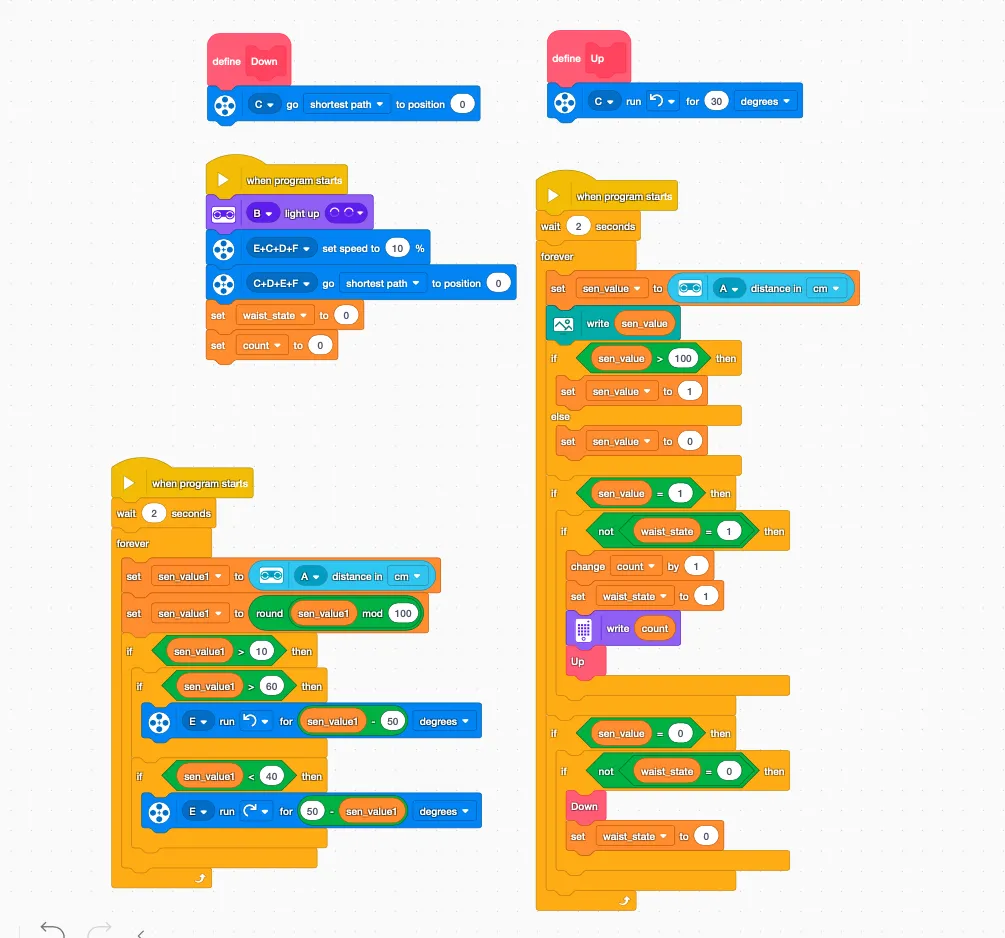
- Left Program: Handles movement; person moves left → coach moves left. Adjust motor direction if needed.
- Right Program: Handles counting with anti-double-count logic.
RobotCode Example
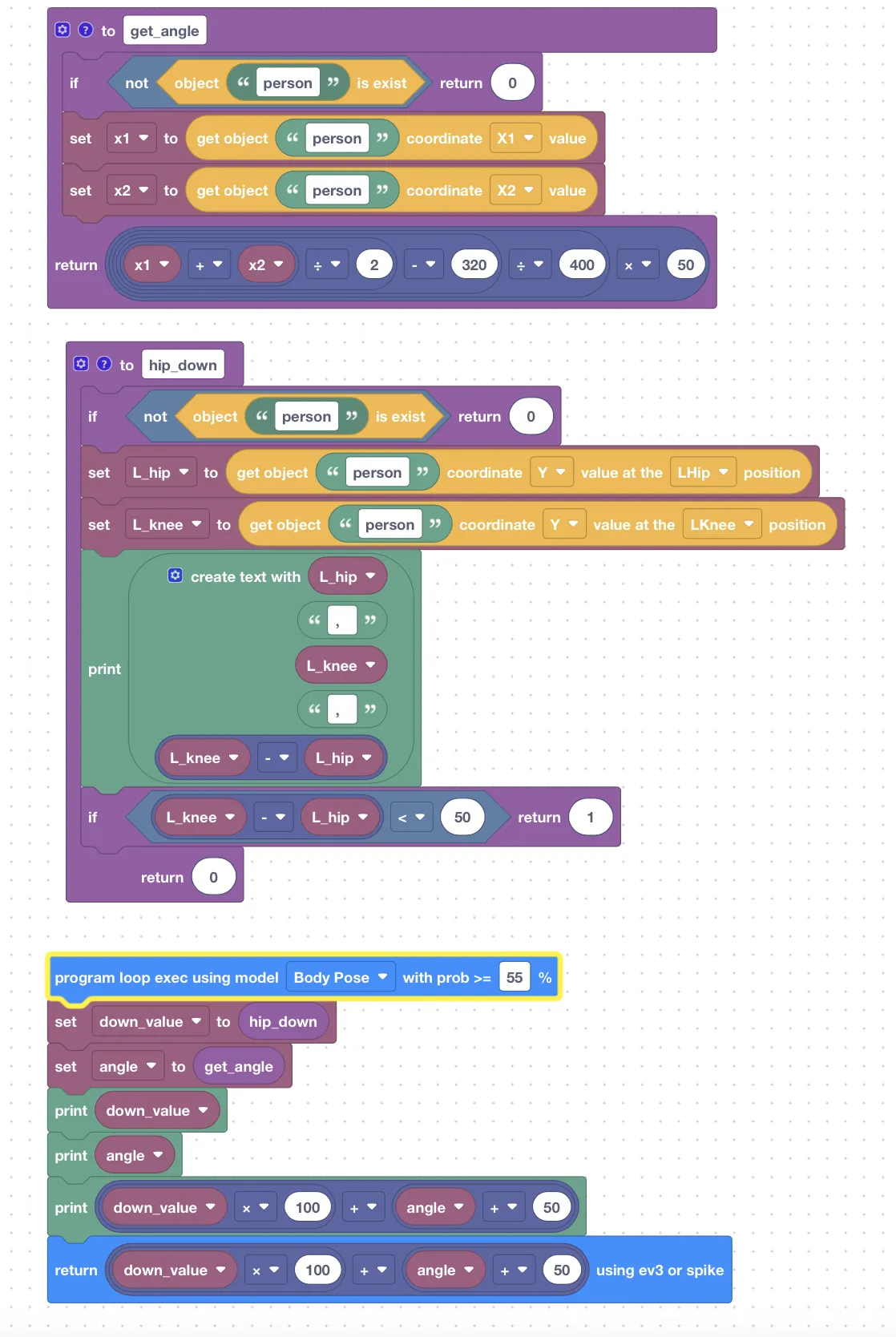
- Hundreds Digit: Counting enable (0 = no, 1 = yes)
- Units + Tens Digit: Turning angle, center point = 50°
V. Demonstration & Testing (10 Minutes)
- Student Rotation: Each student does 3–5 squats
- Observe:
- Accuracy of counting on Hub screen
- Optional: Robot turns to face user as they move left/right
Troubleshooting Guide
| Issue | Potential Cause |
|---|---|
| Under-counting | Squat not deep enough |
| Over-counting | Body jitter/shake triggers multiple counts |
| No detection | Too close/far from sensor; body cut off |
VI. Extension & Thinking (10 Minutes)
- System Upgrades:
- Precision: Distinguish half-squat vs standard (lower threshold)
- Safety: Detect too fast movements (minimum time interval)
- Versatility: Support other exercises (Jumping Jacks, Lunges)
- Evaluation: AI Fitness Score (Reps + Speed + Stability)
VII. Teaching Summary
Skills Mastered
- Pose Estimation applied in fitness
- State Machine + Counting logic
Key Understandings
- AI is not magic; it's rules + data
Mindset Development
- Engineering thinking for real-world AI applications
VIII. Classroom Presentation Material
- Student demonstrations of squat counting
- Real-time count display on Hub
- Robot turning to follow user movement (optional)
🎉 Complete AI Fitness Coach Lesson