Smart Parking Lot
1. Learning Objectives
Understand the application of OCR text recognition (license plate recognition) in intelligent transportation systems (smart parking lots, highway toll systems, smart cities).
Learn how to use the OCR license plate recognition capability of AI vision sensors.
Understand how to implement vehicle entry and exit logic.
Build a complete system including:
- Parking space management
- License plate recording
- Automatic charging system
Develop students’:
- System modeling ability
- Engineering logic thinking
2. Teaching Preparation
1. Hardware
LEGO SPIKE / EV3 Hub × 1
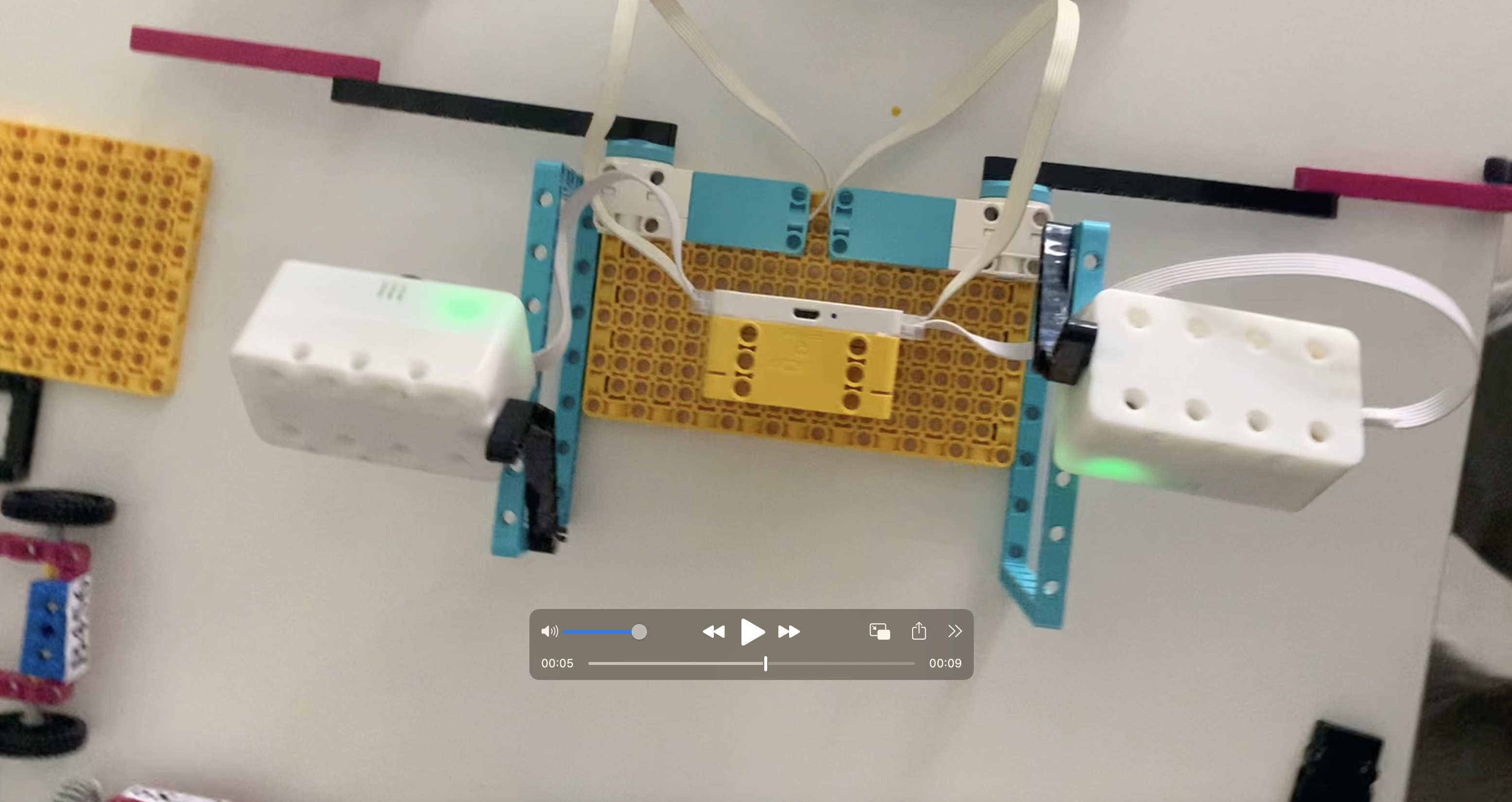
AI Vision Sensors × 2
- Mode: OCR Text Recognition
- Installed at the parking entrance facing incoming vehicles
Medium Motors × 2
- Control the parking gate barrier
LEGO-built parking lot model
- Entrance barrier
- Parking spaces (with configurable maximum capacity)
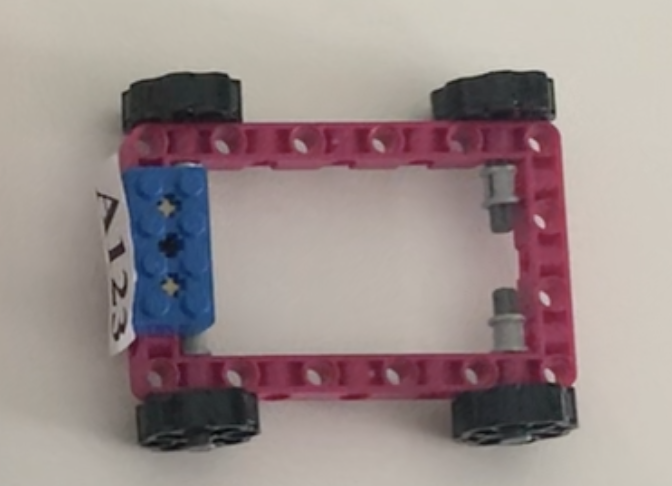
LEGO cars × 4
- Each car has a printed license plate card attached to the front
2. Software
Spike / EV3 / RobotCode programming environment
AI Vision Model:
- OCR (License Plate Recognition)
3. Teaching Materials (Important)
Prepare and print license plate cards in advance (attached to the front of the LEGO cars):
| Car | License Plate |
|---|---|
| Car 1 | A123 |
| Car 2 | B456 |
| Car 3 | C789 |
| Car 4 | D888 |
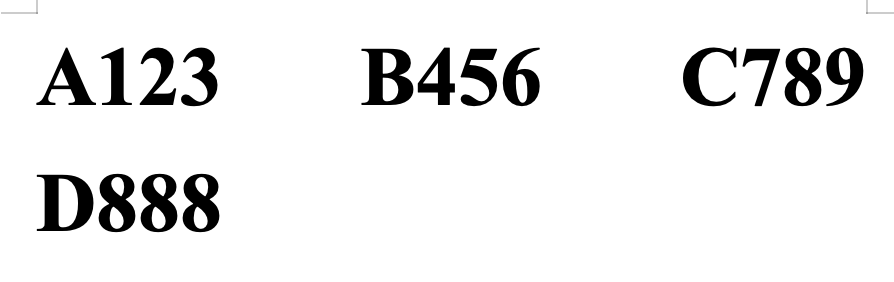
Use large-size printed characters for better OCR recognition.
3. Teaching Process
1. Introduction (5 minutes)
Guiding Questions
- How does a shopping mall parking lot know when your car enters and leaves?
- Why do parking lots no longer require manual charging?
Topic Introduction
Today we will build an:
🚗 AI Smart Parking Management System
Emphasize this sentence:
AI does not just “see cars”; it “recognizes cars”.
2. Scenario and System Principle (5 minutes)
Smart Parking Core Workflow
Vehicle enters
↓
OCR recognizes license plate
↓
Check parking availability
↓
Raise barrier gate
↓
Record entry information
↓
Vehicle leaves
↓
OCR recognizes license plate again
↓
Raise barrier gate
📌 Key Point:
License plate = Vehicle identity
The same vehicle must:
- Enter successfully
- Exit successfully
3. Building (15 minutes)
Installation Requirements
AI Vision Sensor:
- Installed directly in front of the entrance
- Height approximately 10–20 cm
- Camera aligned with the license plate
LEGO Car:
- License plate faces the camera
- Distance approximately 5–15 cm
Scene Requirement:
- Only one car enters or exits at a time
📌 Teacher Tips
- OCR requires clear images
- Text size should not be too small
4. Programming (30 minutes)
Core System Variables (Important)
MAX_PARKING = 3

carPlates = []
Vehicle Entry Logic
Workflow
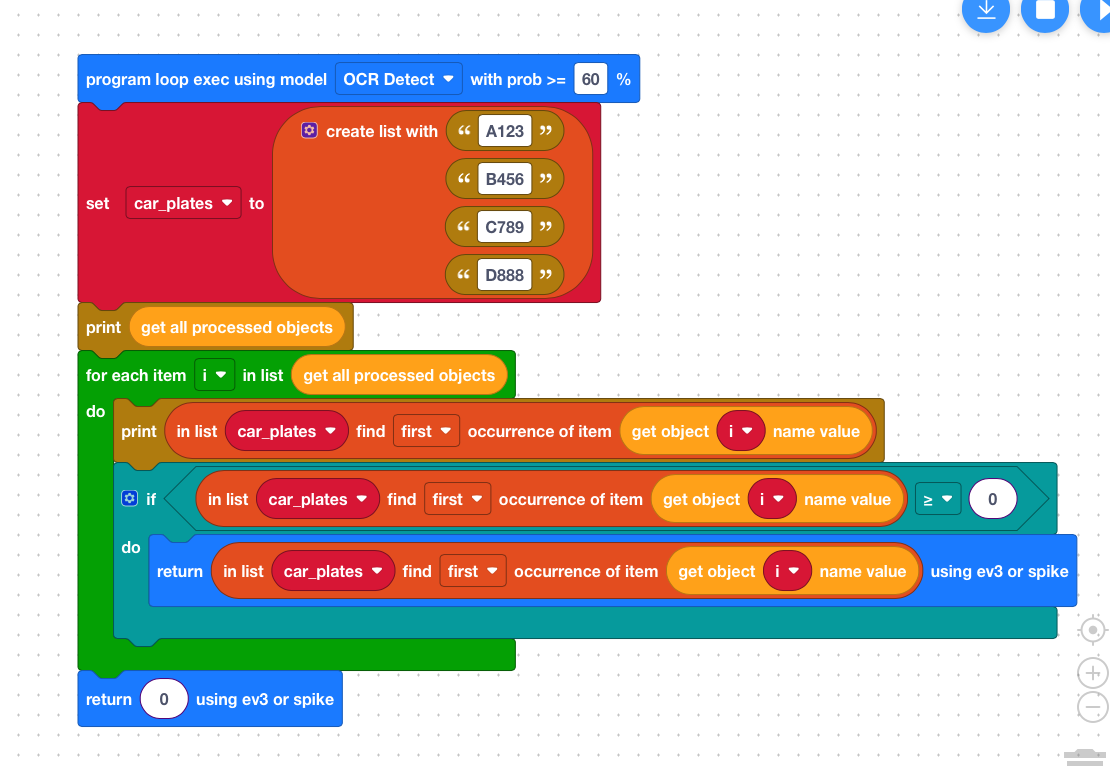
OCR reads the license plate
Check whether the parking lot is full
If not full:
- Raise gate
- Record vehicle
If full:
- Keep gate closed
- Display warning
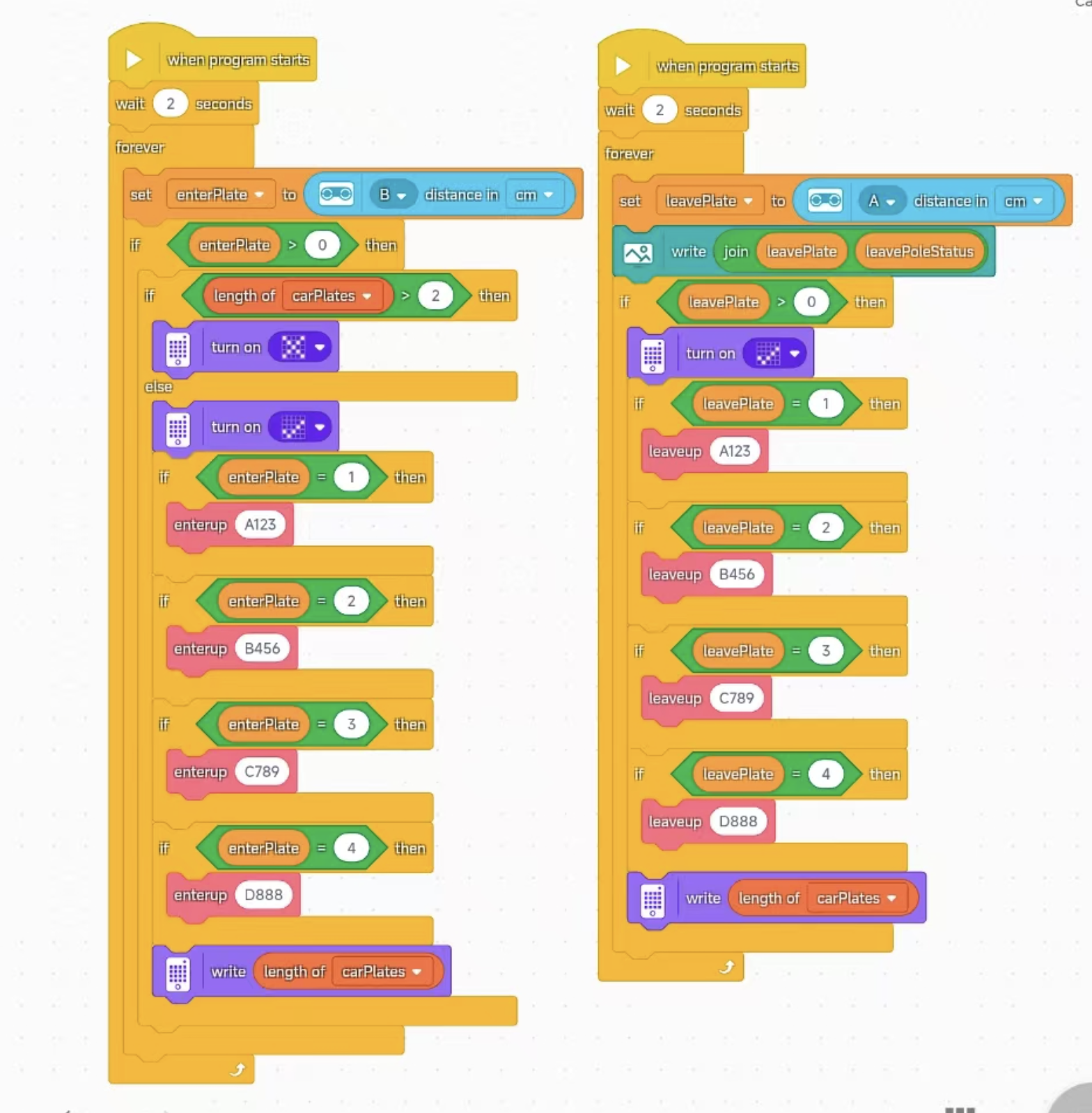
Pseudocode Example (Entry)
Detected license plate = enterPlate

If enterPlate is not empty:
    If currentCars > MAX_PARKING - 1:
        Display ❌
    Else:
        Raise barrier gate
        Add plateID to carList
        Display ✅
📌 Teaching Focus:
- Parking spaces are limited
Vehicle Exit Logic
Workflow
- OCR recognizes the license plate again
- Check whether the vehicle is registered
- Raise gate and remove vehicle record
Charging Rules (Teaching Version)
- Each entry = 5 dollars
OR
- Every 10 seconds = 1 dollar (for classroom demonstration)
Pseudocode Example (Exit)
Detected license plate = plateID

If plateID exists in carList:
    Raise barrier gate
    Remove plateID from carList
Code Examples
SPIKE Program
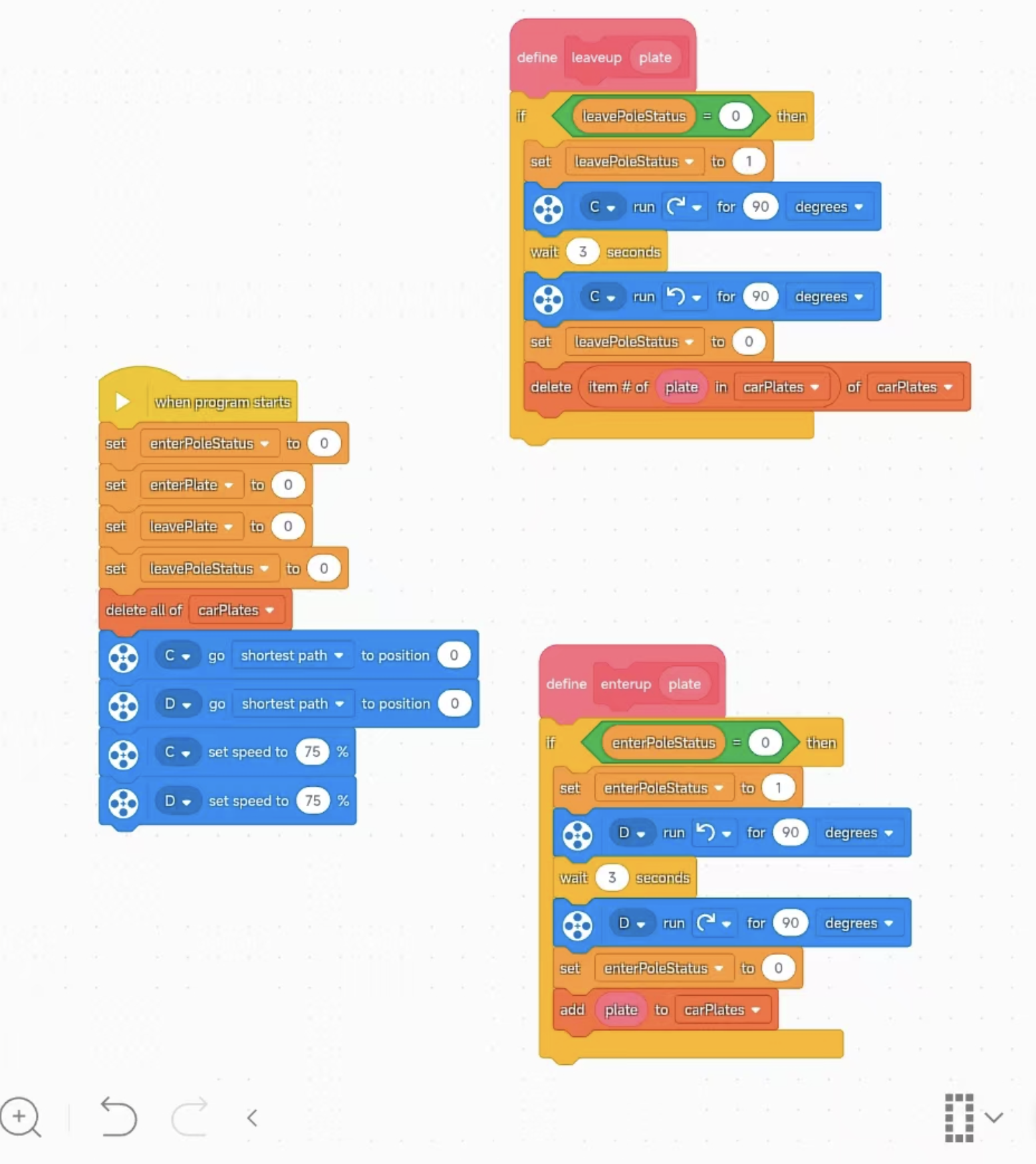
RobotCode Program
5. Demonstration and Testing (10 minutes)
Scenario Demonstration
- First car enters → Gate opens
- Second car enters → Gate opens
- Third car enters → Gate opens
- Fourth car enters → ❌ “Parking Full”
- First car leaves → Display fee → Gate opens
Student Observation Points
- Does OCR recognize the correct plate?
- Is the charging correct?
- Is parking space released correctly?
6. Extension Thinking (10 minutes)
Guide students to upgrade the system:
1. How can parking fees be calculated?
→ Record the entry timestamp. When leaving, use:
Current Time − Entry Time
Then calculate the parking fee.
2. How can repeated recognition of the same vehicle be prevented?
→ Deduplication + Time Lock
3. Can the system display remaining parking spaces?
→ MAX_PARKING − currentCars
4. Can VIP vehicles be added?
→ Specific license plates can park for free.
7. Teaching Summary
Students understood:
- Real-world OCR applications
- License plates as digital identity
Students learned:
- State management
- List and dictionary concepts
- Entry/exit matching logic
Students experienced:
- A real engineering-style AI system